> ## Documentation Index
> Fetch the complete documentation index at: https://docs.textsetu.com/llms.txt
> Use this file to discover all available pages before exploring further.
# Content Delivery
> Publish translations as cacheable files your app fetches at runtime, no redeploy needed.
**Content delivery** publishes your translations as cacheable files your app
fetches at runtime. Changing a string becomes a *publish* instead of a
*redeploy* — no rebuild, no app-store review, no waiting for the next release
train.
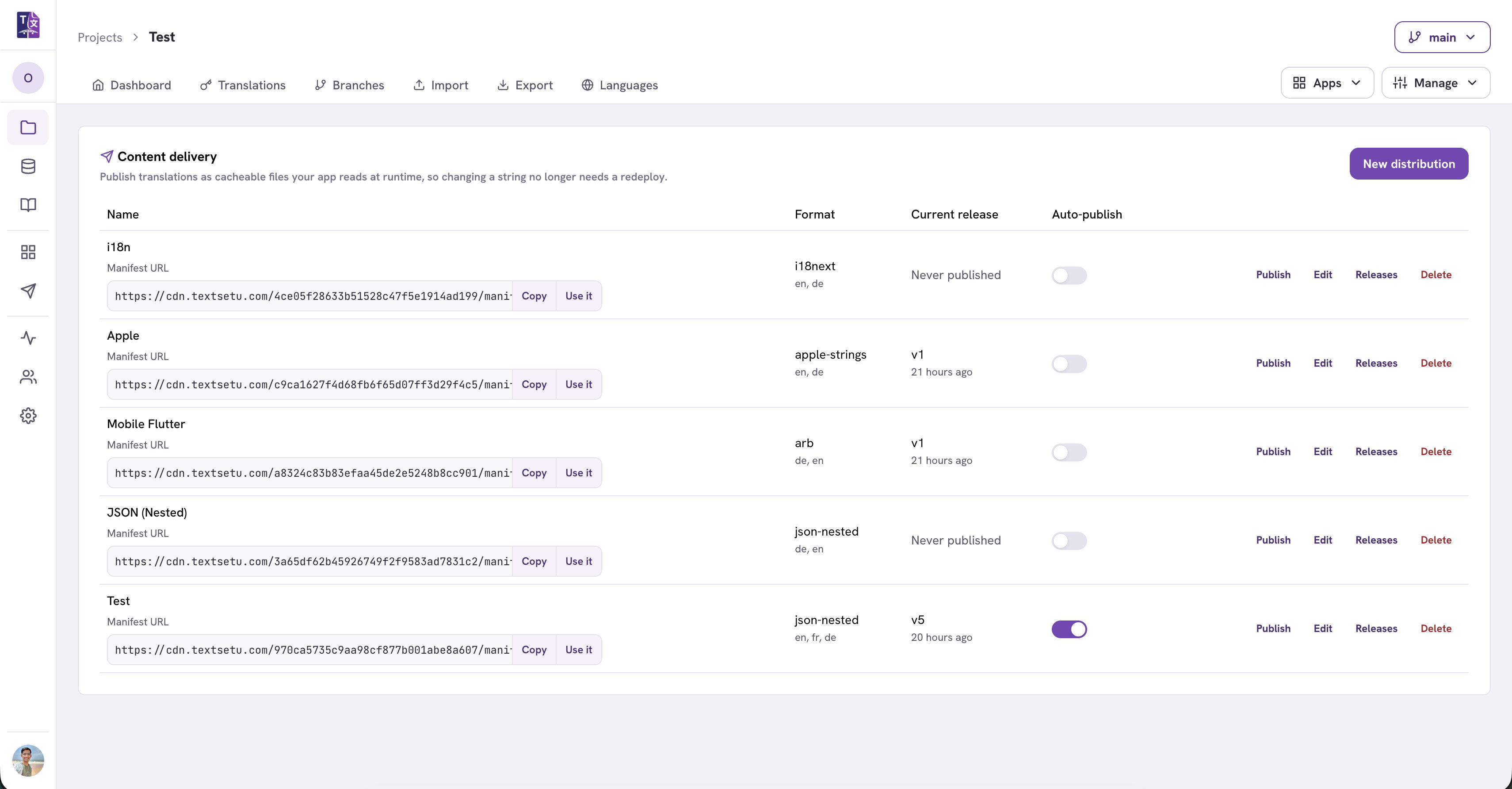
You create a **distribution** — a named, standing export configuration (format,
languages, filters) — and publish it. TextSetu renders the files, stores them on
a CDN, and gives you one **manifest URL** that never changes. Your app reads
that URL and follows it to the file it needs.
Once you've published, see
[Using a distribution in your app](/docs/guides/content-delivery-integration) for the
client-side code.
***
## How it works
Three pieces, and it's worth understanding the split because it's what makes
this both fast and safe:
1. **A distribution** is a saved export config. It doesn't hold any
translations — it describes *which* ones to publish and in what format.
2. **A release** is an immutable snapshot. Every publish renders the current
translations, hashes them, and stores the result. Releases are numbered
(`v1`, `v2`, …) and never change once created.
3. **The manifest** is a small JSON document listing every published file with
an absolute URL. It's the only thing that changes when you publish.
The files themselves are **content-addressed** — their URL contains a hash of
their contents, so a given URL always returns the same bytes and can be cached
forever. Only the manifest has a short cache lifetime (60 seconds).
That has three consequences worth knowing:
* **Publishing is cheap.** A language whose strings didn't change keeps the same
hash, so it isn't re-uploaded.
* **Your app stays fast.** After the first fetch, unchanged files come from the
browser or CDN cache without a network round trip.
* **Your app survives our outages.** The manifest is served with
`stale-if-error`, so if TextSetu is unreachable your app keeps working from
the last manifest it saw for up to 24 hours.
**Not sure whether you need this?**
If you currently export a file and commit it to your repo, content delivery
removes that step. If you're happy shipping translations with your build, the
regular [Import & Export](/docs/guides/import-export) flow is simpler and there's no
reason to switch.
***
## Finding it
Open a project → **Manage** → **Content delivery**.
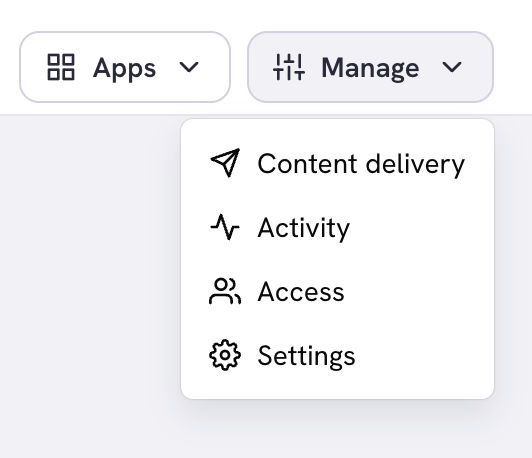
Anyone who can view the project can see this page. Creating, editing and
publishing require **Manage project** permission — see
[Roles & Permissions](/docs/guides/roles-and-permissions).
***
## Creating a distribution
Click **New distribution**.
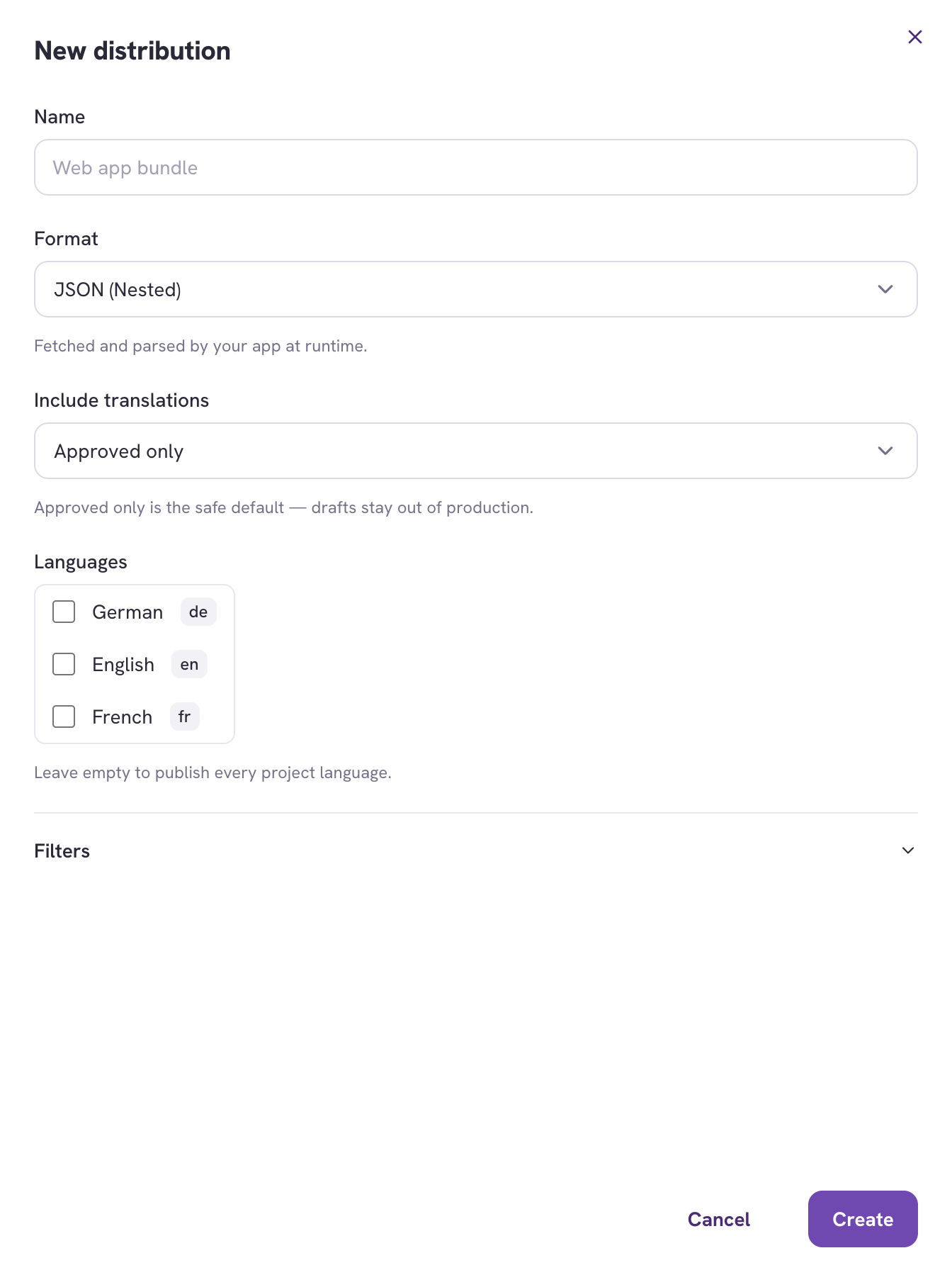
| Field | What it does |
| ------------------------ | ----------------------------------------------------------------------------------------------------------------------------------------------------- |
| **Name** | Your label for it. A project usually has more than one — e.g. a JSON bundle for the web app and an `.arb` file for the mobile app. |
| **Format** | Any format TextSetu can export. Grouped by how it's consumed — see below. |
| **Include translations** | Which approval states to publish. **Approved only** is the default and the safe choice. |
| **Languages** | Leave empty to publish **every** project language, including ones you add later. Pick specific ones only if you deliberately want to freeze the list. |
### Choosing a format
The picker groups formats by what they're *for*, because that determines how
your app consumes them:
| Group | Examples | How you use it |
| ------------------------- | --------------------------------------------------------- | --------------------------------------------------------------------------------------------------------- |
| **Web runtime** | `i18next`, `json-nested`, `json-flat`, `formatjs`, `yaml` | Fetch and parse in the app. |
| **Mobile** | `arb`, `android-xml`, `apple-strings`, `xcstrings` | Fetch, cache to disk, parse yourself. Packaged resources are resolved at build time and are not replaced. |
| **Server runtime** | `gettext`, `java-properties`, `resx`, `rails-yaml` | Fetch into the directory your framework reads at boot. |
| **Interchange** | `xliff-1.2`, `xliff-2.0`, `qt-ts`, `excel` | Pull in CI and feed a build step. |
| **Documents & subtitles** | `srt`, `webvtt`, `html`, `markdown` | Hand the URL straight to a player or renderer. |
Every format is publishable — the grouping is guidance, not a restriction.
Publishing XLIFF for a vendor to pull is a perfectly good reason to use this.
The full list is in the
[Supported File Formats](/docs/reference/file-formats) reference.
### Filters
Expand **Filters** to narrow what gets published.
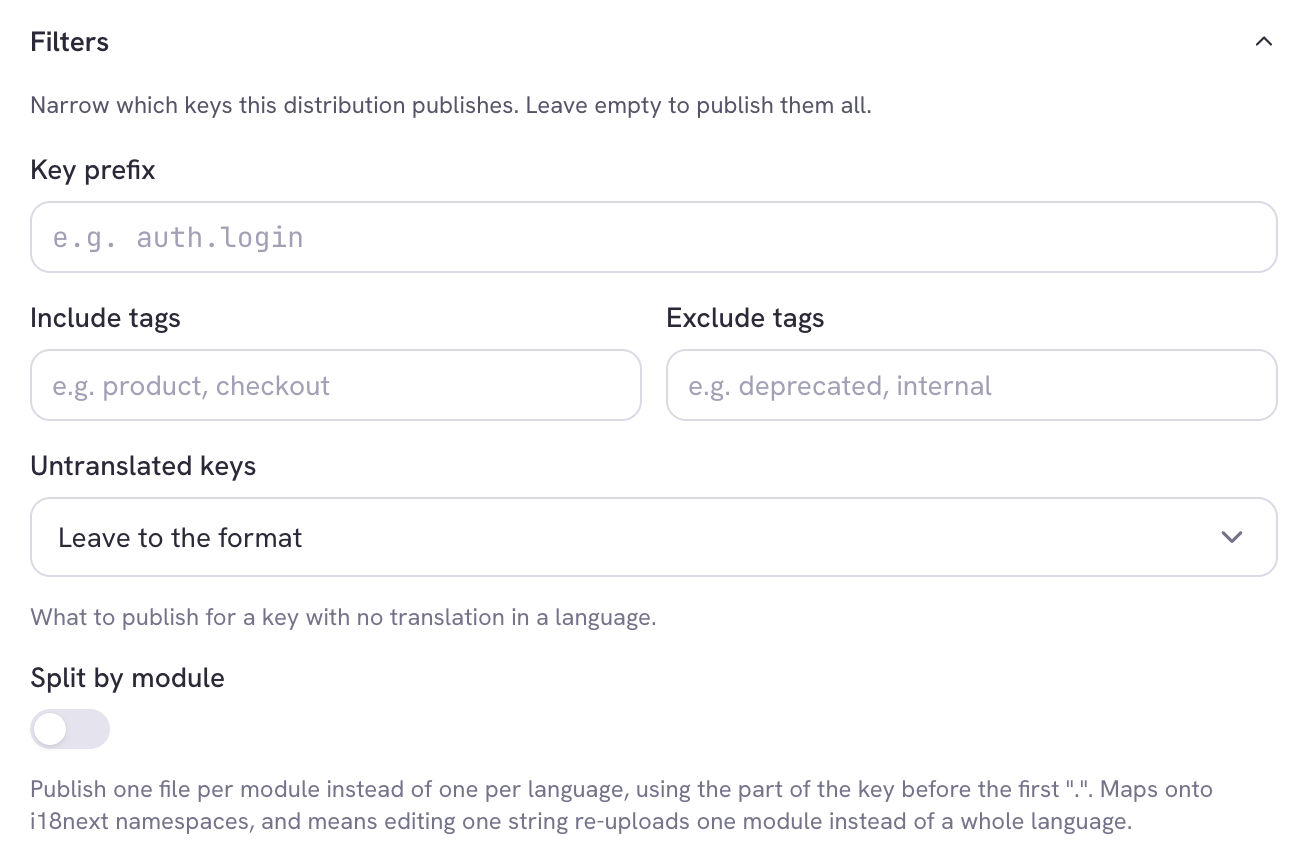
* **Key prefix** — publish only keys starting with, say, `checkout.`. Useful for
shipping one area of the product to one surface.
* **Include tags / Exclude tags** — filter by the tags on your keys. Excluding
`internal` or `deprecated` is the common case.
* **Untranslated keys** — what to publish for a key with no translation in a
language:
* **Leave to the format** *(default)* — let the file format decide. Key-value
formats like JSON simply omit the key; formats with a fixed record shape
like XLIFF or Android XML emit an empty value, because the record has to
exist.
* **Omit the key** — drop it entirely, so your app's own fallback chain takes
over instead of rendering a blank.
* **Fall back to the source language** — publish the source string. Showing
English to a French user usually beats showing nothing.
* **Split by module** — see below.
**Untranslated keys matter more here than in a normal export**
A downloaded file gets eyeballed. A published file goes straight to production.
If your framework has a fallback language configured, **Omit the key** lets it
do its job; otherwise **Fall back to the source language** avoids blank UI.
### Split by module
Off by default. When enabled, TextSetu publishes one file per **module per
language** instead of one file per language, where the module is the part of the
key before the first separator — so `checkout.title` and `checkout.pay` land in
`fr/checkout.json`.
Two reasons to turn it on:
* **Your app loads less per screen.** This maps one-to-one onto i18next
namespaces, so a checkout page can load only the checkout strings.
* **Publishing gets cheaper.** Editing one string re-uploads one module's file
rather than the whole language — which matters most with auto-publish on.
**Module depth** controls how many key segments make up the module name. Depth 1
turns `checkout.cart.title` into module `checkout`; depth 2 into
`checkout.cart`.
**Key prefixes are stripped inside module files**
`checkout.title` ships inside `checkout.json` as just `title`. That's required —
i18next resolves a key *within* its namespace. See
[Using namespaces](/docs/guides/content-delivery-integration#split-by-module-i18next-namespaces)
for what this means in your code.
***
## Starting from an export
If you've already configured an export — format, languages, filters — you don't
need to retype it. On the **Export** page, under the summary, choose
**Publish this continuously**.
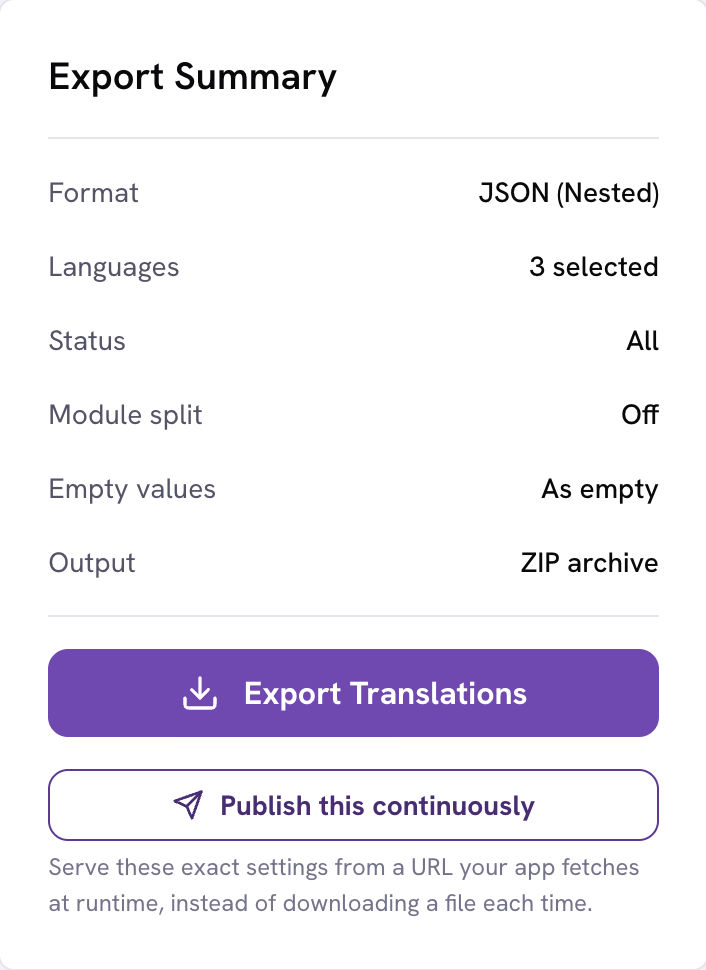
The distribution drawer opens prefilled with those settings. Nothing is
published until you name it and click **Create**.
A few export options have no continuous equivalent and are listed in the drawer
rather than silently dropped:
* **Key order** and **descriptions** — presentation choices for a one-off file.
* **Branch** — a distribution always publishes from the main branch. Pinning a
public URL to a feature branch is almost never what you want.
* Some **status** filters — "untranslated" and "translated" describe per-key
coverage rather than an approval state.
***
## Publishing
Press **Publish** on the distribution's row. The build runs in the background;
the row updates when it lands.
Three outcomes:
* **A new version** — `v3`, say. The manifest now points at it.
* **"Already up to date"** — the rendered content was byte-identical to the
current release, so **no release was created**. This is a success, not a
no-op error. It's also why auto-publish is affordable: an edit your filters
exclude costs nothing.
* **A failure** — the row shows the error. The previously published release
keeps serving; a failed publish never takes your app offline.
### The manifest URL
Each distribution has one permanent manifest URL, shown in the list with a
**Copy** button. It survives publishes, rollbacks and format changes — that's
the whole point. Paste it into your app once.
**Use it** opens ready-made code for your distribution's format, generated
against your real manifest URL.
**Treat the manifest URL as unlisted, not secret**
The endpoint is public and unauthenticated — that's what lets a browser app
fetch it with no credentials. The URL contains 128 bits of randomness so it
can't be guessed or enumerated, but anyone holding it can read your published
translations. Publish only what you're comfortable shipping to clients, which is
the same bar as the strings compiled into your app.
If a URL does leak, it can be **rotated**: every stored file moves to a new
address, the manifests are rewritten, and the old objects are deleted, so the
leaked URL stops working. This isn't a button in the UI yet — ask your
administrator to run it. Your app then needs the new URL, so plan the change
alongside a release.
The self-serve alternative is to delete the distribution and create a new one,
which mints a fresh URL immediately. You lose the release history, so prefer
rotation where the history matters.
***
## Auto-publish
Toggle **Auto-publish** on a distribution and it republishes itself whenever the
translations behind it change — approvals, edits, imports, new keys, branch
merges.
Changes are **debounced** (60 seconds by default), so importing 5,000 strings
triggers one publish, not 5,000. Editing the distribution's own settings also
arms it, so a format or filter change goes live on its own.
There's a ceiling of 20 automatic publishes per distribution per hour. Hitting
it means something is churning; the skip is logged rather than silent.
**Pair it with approval**
Auto-publish plus **Approved only** is the combination most teams want: a
translator's edit goes live the moment a reviewer approves it, and nothing
unreviewed ever reaches production. See the
[Approval workflow](/docs/guides/approval-workflow).
***
## Editing a distribution
**Edit** reopens the drawer with everything editable — format, languages,
filters, module splitting, provider.
Changing something that affects the *output* doesn't republish on its own. The
live release keeps serving the old settings until the next publish, and TextSetu
says so when you save. If auto-publish is on, it picks the change up on its own
debounce.
***
## Releases and rollback
**Releases** opens the history: every version with its size, file count, when it
was published, and whether the CDN cache was cleared.
**Roll back to this** re-points the manifest at an earlier release. It's a
pointer swap, not a rebuild — the files are still stored, so it takes effect
within the manifest's 60-second cache and needs no change in your app.
That makes rollback the right first move when a bad string reaches production:
roll back, then fix the translation properly.
***
## Release retention
Old releases are cleaned up automatically. By default the **most recent 10** per
distribution are kept in full; your organization's plan may allow more.
The **current** and **previous** releases are always kept regardless, so
one-click rollback never breaks.
### "History only" releases
Past that limit, a release isn't deleted — it's **tombstoned**. The row stays in
your history with its version, content hash, size and author, so "what did we
ship in v11" remains answerable. What's removed is the published files.
A tombstoned release is badged **History only** and has no rollback button,
because there is nothing left to serve.
**A tombstone can come back**
If you republish content identical to a tombstoned release, it revives that
same release rather than creating a duplicate — the version number and history
are preserved.
**What this means in practice:** your rollback window is the retention limit. If
you need to roll back further than that, publish the older content again rather
than rolling back to it. If your team needs a longer window, ask your
administrator — the limit is set per organization.
***
## Usage
**Delivery usage** in the main sidebar reports requests, bandwidth, publishes
and cache hit rate. It's organization-wide — every project's distributions in
one view — and needs organization read access.
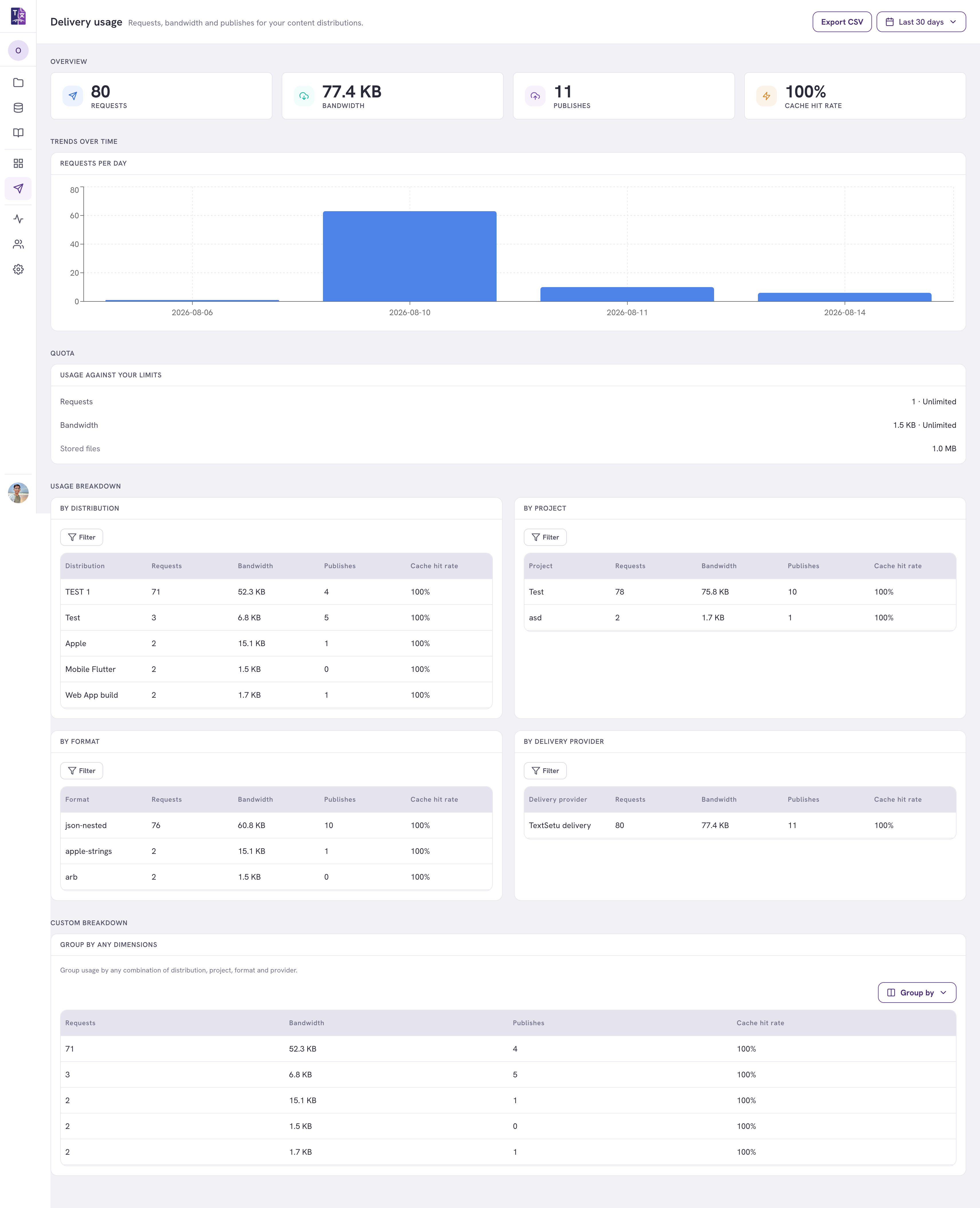
* **Overview** — totals for the selected window.
* **Requests per day** — the traffic trend.
* **Usage against your limits** — where you are against your plan's quota.
"Unlimited" means no cap is set.
* **Breakdowns** — by distribution, project, format and delivery provider, plus
a **custom breakdown** you can group by any combination of those.
* **Export CSV** exports the **full** selected range, not just the visible page.
**Cache hit rate** is the share of requests served by the CDN edge without
reaching TextSetu. With content-addressed files this is normally very high —
that's the design working. It reads "—" when there's no edge data yet.
Going over quota does **not** take your app offline: TextSetu keeps serving and
flags it on this page.
***
## Publishing to your own storage and CDN
Every project publishes through TextSetu's CDN out of the box, with nothing to
configure. Adding your own provider is **optional** — do it only if you want the
files on storage and a CDN you control.
Good reasons to: you already have a CDN and want one cache and one bill; you
need the files inside your own network or region; or your compliance rules
require it.
Set it up at **Organization settings → Content delivery**. It's org-level, so
every project can use it.
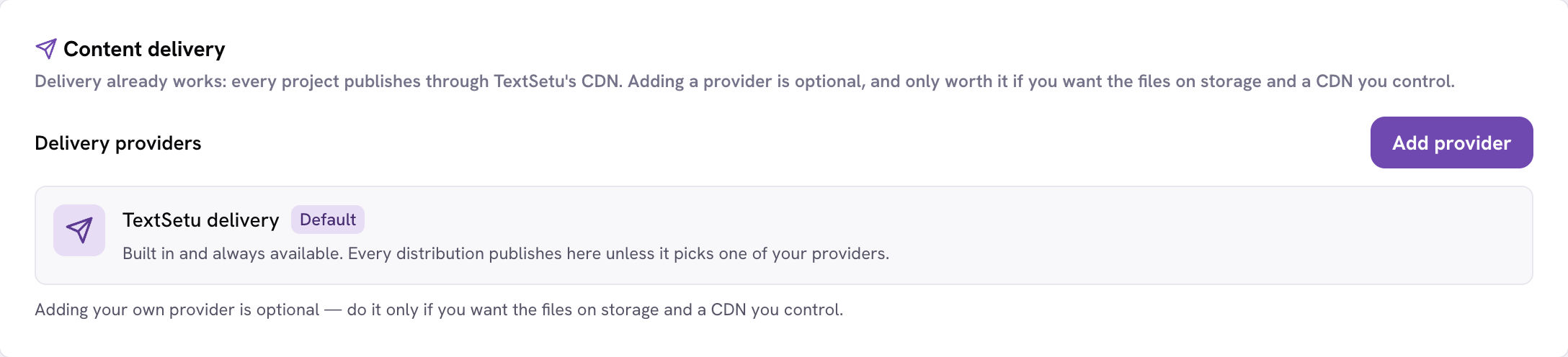
Adding a provider requires **Manage organization** permission.
### Step 1 — Choose a provider
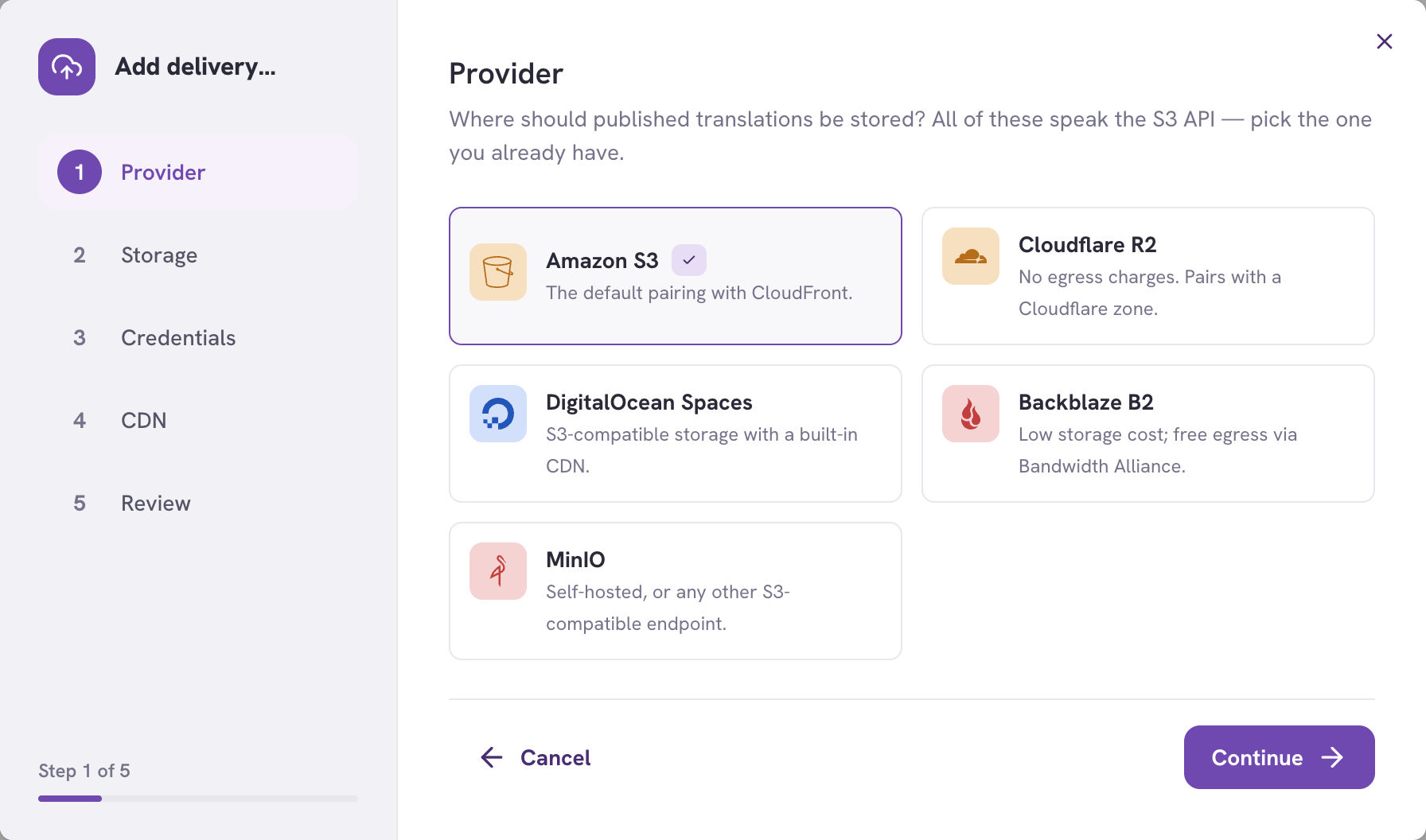
All five speak the S3 API — pick the one you already have.
| Provider | Why you'd pick it |
| ----------------------- | --------------------------------------------------------- |
| **Amazon S3** | The default pairing with CloudFront. |
| **Cloudflare R2** | No egress charges. Pairs with a Cloudflare zone. |
| **DigitalOcean Spaces** | S3-compatible storage with a CDN built in. |
| **Backblaze B2** | Low storage cost; free egress via the Bandwidth Alliance. |
| **MinIO** | Self-hosted, or any other S3-compatible endpoint. |
### Step 2 — Storage
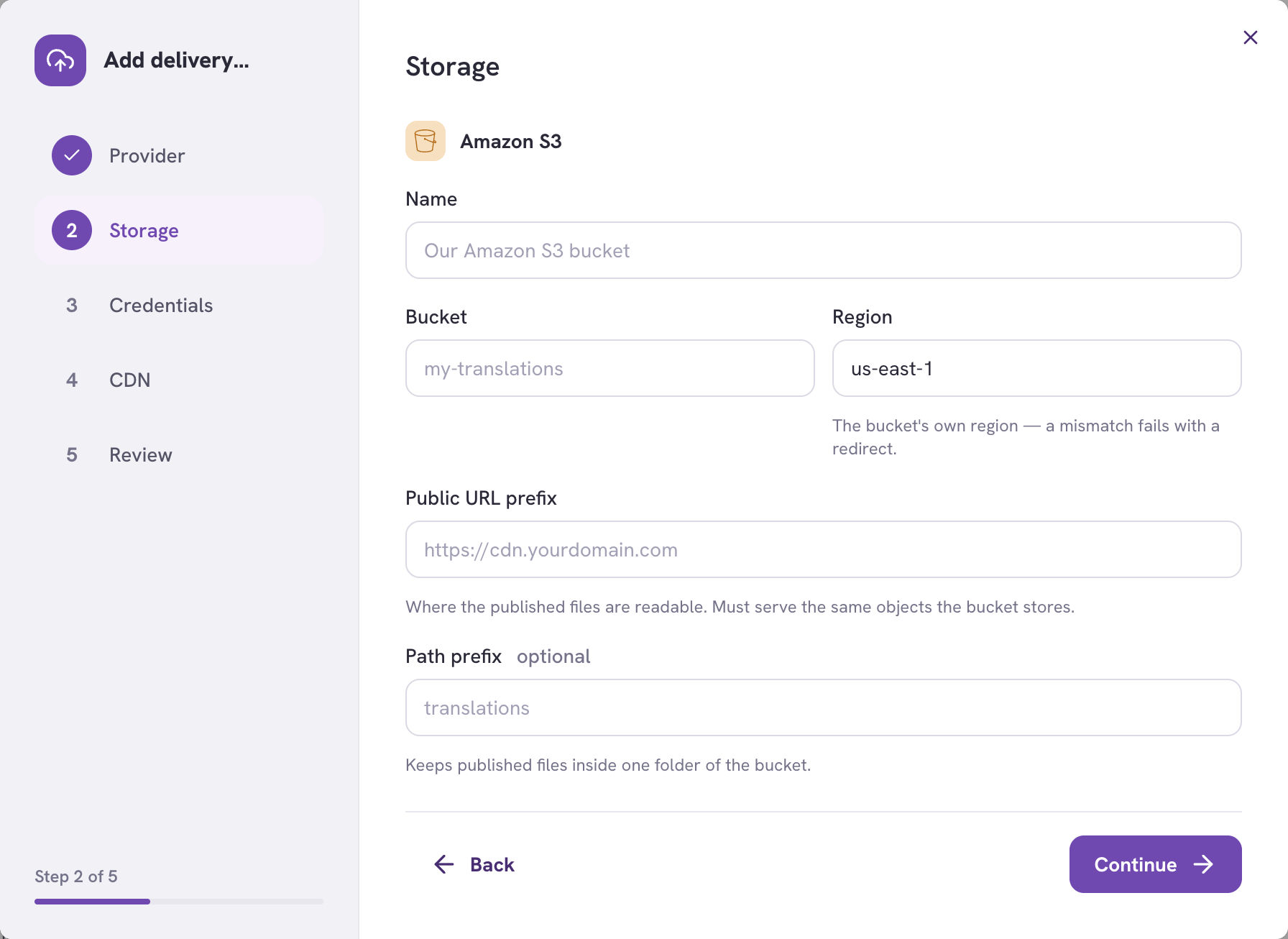
* **Bucket** and **Region** — the region must be the bucket's own; a mismatch
fails with a redirect.
* **Public URL prefix** — where the published files are readable from. This is
your CDN's domain if you have one in front, or the bucket's public URL if not.
It must serve the same objects the bucket stores.
* **Path prefix** *(optional)* — keeps published files inside one folder, so you
can share a bucket with other content.
### Step 3 — Credentials
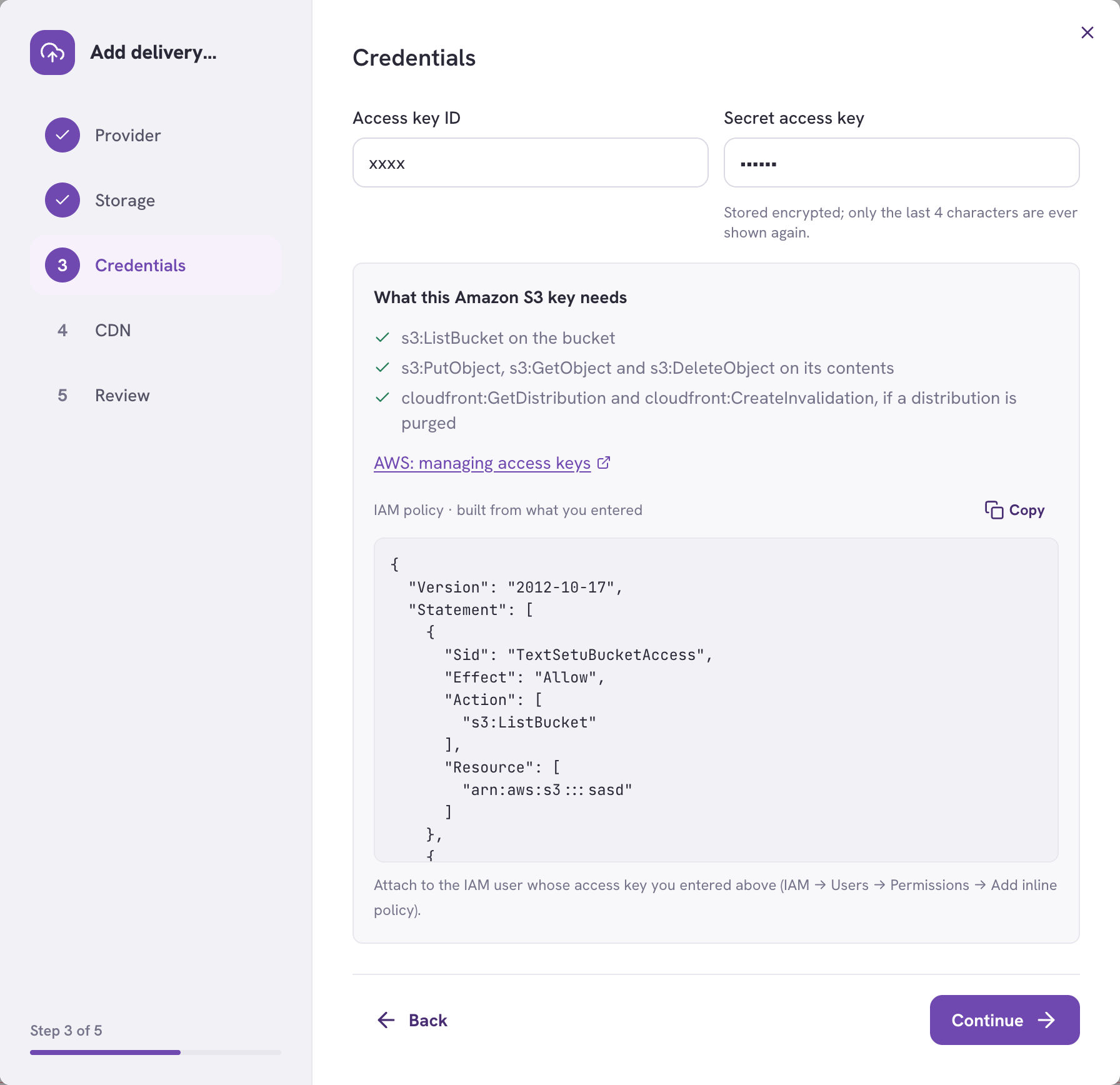
Secrets are stored encrypted and only their last four characters are ever shown
again.
TextSetu generates the exact IAM policy from what you entered — copy it and
attach it to the key's user. It grants precisely what publishing needs:
* `s3:ListBucket` on the bucket
* `s3:PutObject`, `s3:GetObject` and `s3:DeleteObject` on its contents
* `cloudfront:GetDistribution` and `cloudfront:CreateInvalidation`, if you're
purging a distribution
**Grant the whole policy**
Every action is used. `s3:ListBucket` in particular is needed for the bucket
check, so a key without it fails verification immediately — right after you
followed the instructions. The policy shown is the minimum, not a suggestion.
For R2, Spaces and B2 no policy is shown: scope those credentials in the
vendor's own console.
### Step 4 — CDN (optional)
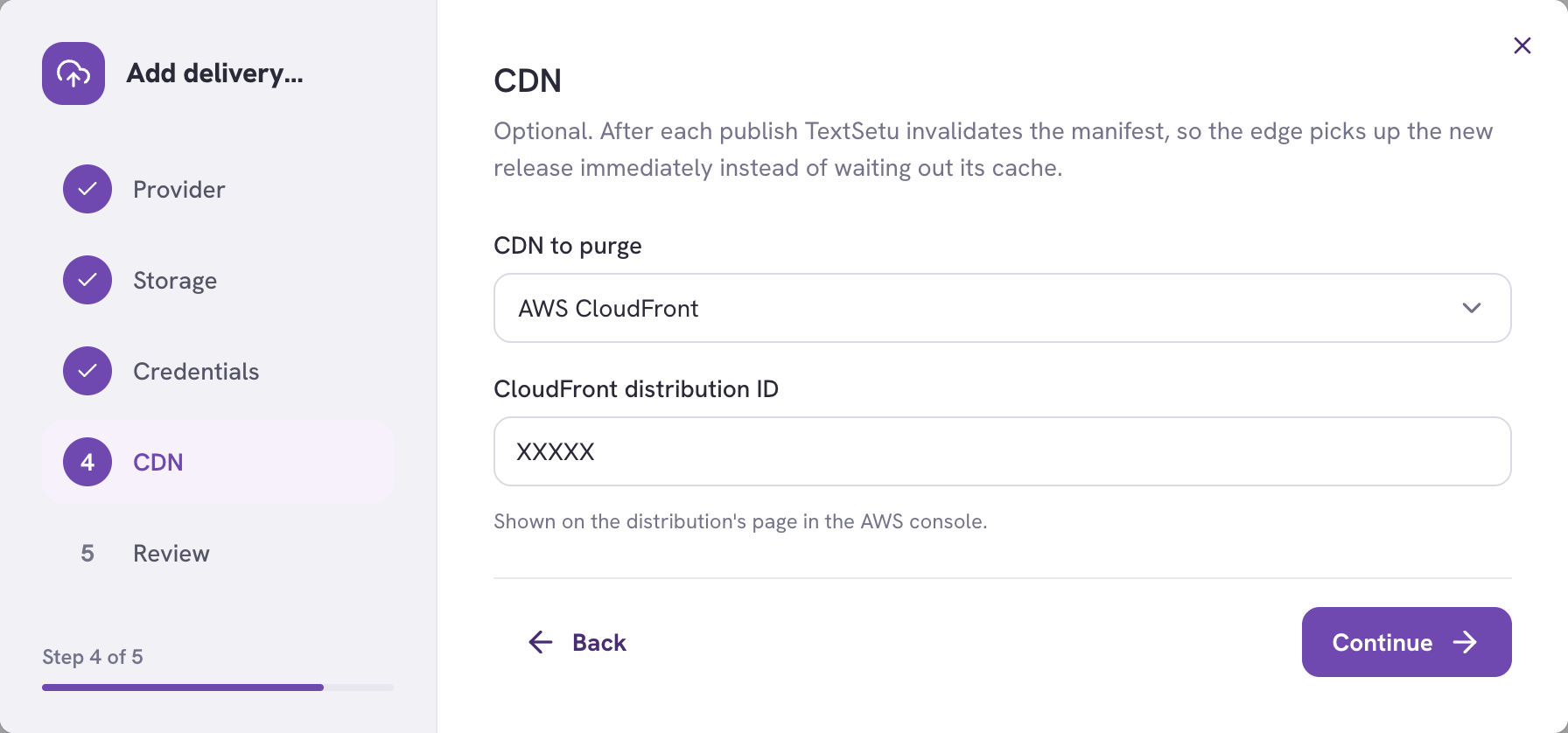
After each publish TextSetu invalidates the manifest, so the edge picks up the
new release immediately instead of waiting out its cache. Only the manifest is
invalidated — the files are content-addressed, so a changed file is a different
URL and there's nothing to purge.
* **AWS CloudFront** — needs the distribution ID from its page in the AWS
console.
* **Cloudflare** — needs the zone ID and an API token with the
**Zone → Cache Purge** permission.
**CloudFront in front of a non-AWS bucket needs its own AWS key**
A CloudFront distribution can sit in front of any HTTP origin, including R2,
B2, Spaces or MinIO — that pairing is fine. But an R2 or MinIO key means nothing
to AWS, so invalidation needs a separate AWS access key. The wizard asks for one
when your storage isn't S3.
### Step 5 — Review
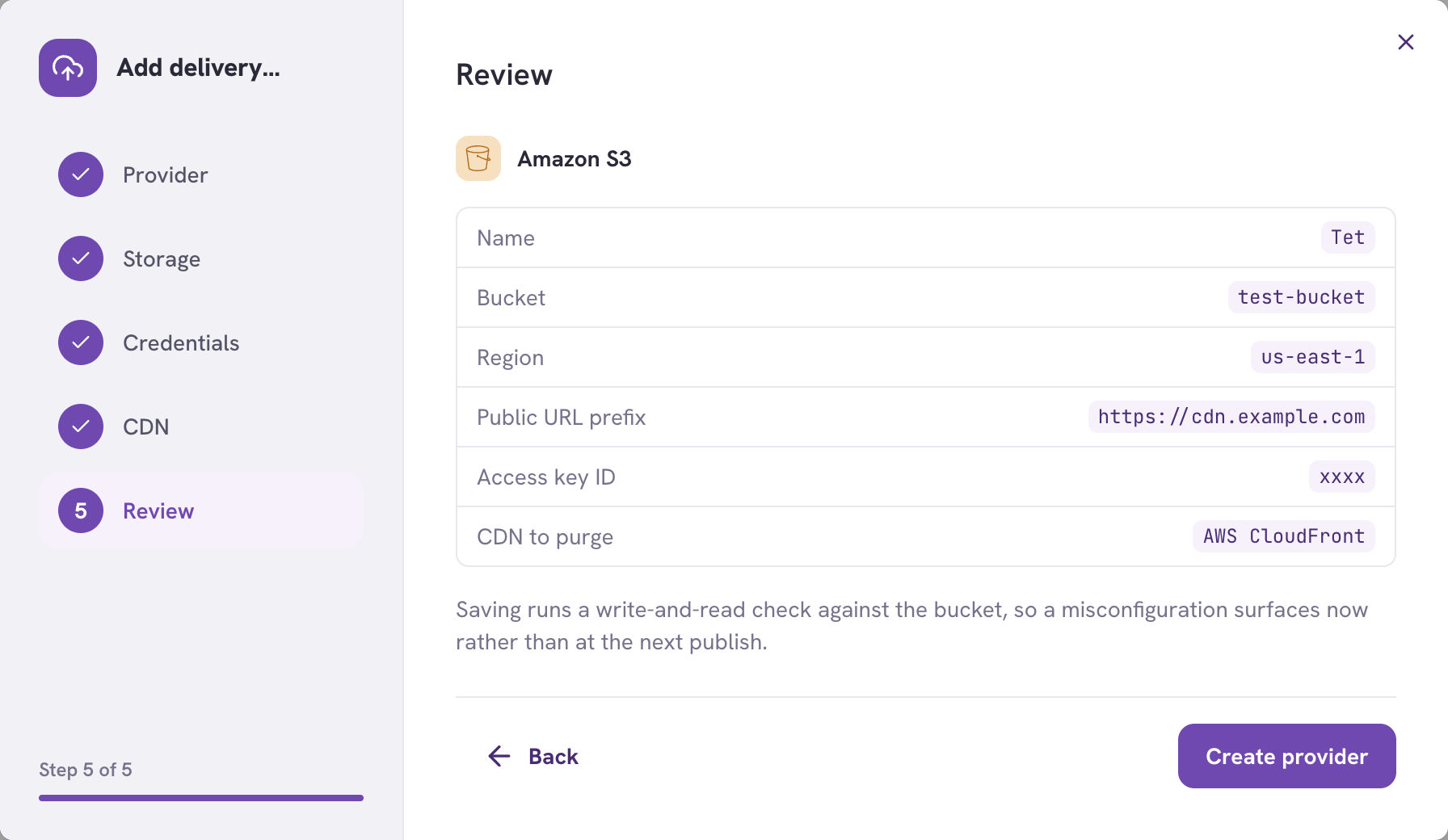
Saving runs a real write-and-read check against the bucket, so a
misconfiguration surfaces now rather than at your next publish.
### Using it
Once a provider exists, pick it in a distribution's **Publish to** field. Leave
it as *TextSetu delivery* and nothing changes.
**Verify** re-runs the storage check at any time.

The provider also shows a warning when **cache invalidation** is failing
repeatedly. That's tracked separately from Verify on purpose: a provider can
verify perfectly — the bucket credentials are fine — while every invalidation
fails because a CloudFront permission expired. Collapsing the two would hide
exactly that.
**Switching a distribution's provider re-uploads everything**
Upload deduplication is per provider, and the new bucket is empty. This is
intentional — assuming a file was already there would publish a manifest full of
broken links.
A provider **can't be deleted while distributions still publish to it**. Repoint
those distributions first.
***
## Getting notified
Subscribe to these [webhook](/docs/guides/webhooks) events to react to a publish without
polling:
| Event | When |
| ----------------------------- | ----------------------------------------------------- |
| `distribution.published` | A new release went live. |
| `distribution.rolled_back` | The manifest was pointed at an earlier release. |
| `distribution.publish_failed` | A publish failed. The previous release keeps serving. |
Typical use: warm a cache, or tell long-running clients to re-read the manifest.
***
## Troubleshooting
| Symptom | Cause and fix |
| --------------------------------------------------- | --------------------------------------------------------------------------------------------------------------------------------------------------------------------------------------------------------- |
| **Manifest URL returns 404** | The distribution is paused or was never published. Press **Publish** once. A deleted distribution's URL also 404s permanently. |
| **Manifest returns `{"status":"building"}`** | The first release is still rendering. Retry after a few seconds — your client should honour `Retry-After`. |
| **App still shows old strings** | The manifest is cached for 60s, so wait a minute. If it persists, check the release list: a failed **edge cache clear** means the CDN is still serving the previous manifest until its TTL expires. |
| **"Already up to date" when you expected a change** | The change didn't affect what this distribution publishes — most often it isn't approved yet and the filter is **Approved only**, or a key filter excludes it. |
| **Files return 403 from your own bucket** | The bucket is private and has no CDN in front. Verification passes because it authenticates as your key, while your users are anonymous. Either put a CDN in front or make the objects publicly readable. |
| **Verification fails with "access denied"** | The key is missing a permission from the generated policy — most often `s3:ListBucket`, which is on the *bucket* ARN rather than its contents. |
| **Cache invalidation failing repeatedly** | The CDN credential expired or the distribution ID changed. Fix it and press **Verify**. Publishing still works; content is just stale until the manifest TTL expires. |
| **Release shows "History only"** | It was tombstoned by retention. Its files are gone and it can't be rolled back to — publish the content again instead. |
***
## Related
* [Using a distribution in your app](/docs/guides/content-delivery-integration) — client code for every format
* [Content delivery manifest](/docs/reference/content-delivery-manifest) — the manifest schema and cache contract
* [Import & Export](/docs/guides/import-export) — one-off files instead of continuous publishing
* [Webhooks](/docs/guides/webhooks) — react to a publish
* [Approval workflow](/docs/guides/approval-workflow) — control what reaches production