> ## Documentation Index
> Fetch the complete documentation index at: https://docs.textsetu.com/llms.txt
> Use this file to discover all available pages before exploring further.
# GitHub Sync
> Keep a TextSetu project and a GitHub repository in step, automatically.
The **GitHub Sync** app keeps a TextSetu project and a GitHub repository in step:
source strings flow **into** TextSetu, finished translations flow **back** to the
repo as a pull request. Once connected, it can run automatically on every push,
so localization becomes part of your normal development loop instead of a manual
export/import chore.

***
## How it works
TextSetu uses an **asymmetric** model, the same one used by most localization
platforms:
* **Your repository owns the source.** The source-language files in your repo are
the single source of truth for *what* needs translating. **Pull** imports those
keys into TextSetu.
* **TextSetu owns the translations.** Translators work in TextSetu. **Push** writes
the translated languages back to your repo as a **pull request** — your source
files are never overwritten.
This split avoids edit conflicts: each side only writes what it owns.
| Action | Direction | What moves | Result |
| ------------------- | --------------- | ----------------------------------------------- | -------------------------------- |
| **Pull** | repo → TextSetu | source-language keys only | keys created/updated in TextSetu |
| **Push** | TextSetu → repo | translated languages only | a pull request on your repo |
| **Import existing** | repo → TextSetu | source **and** existing translations (one-time) | keys + translations seeded |
> **Why not two-way on everything?** If both sides could overwrite the same file,
> a translator's edit and a developer's edit would collide. Keeping source in the
> repo and translations in TextSetu makes every sync a clean, one-directional move.
***
## Prerequisites
* A GitHub repository you can install a GitHub App on (org owner/admin on GitHub).
* The **Manage organization** permission in TextSetu (to install the GitHub App at
the org level) and **Manage project** (to connect a project).
* Your translation files in a [supported format](/docs/reference/file-formats) —
JSON, XLIFF, Android XML, Apple `.strings`, Gettext `.po`, YAML, and 30+ more.
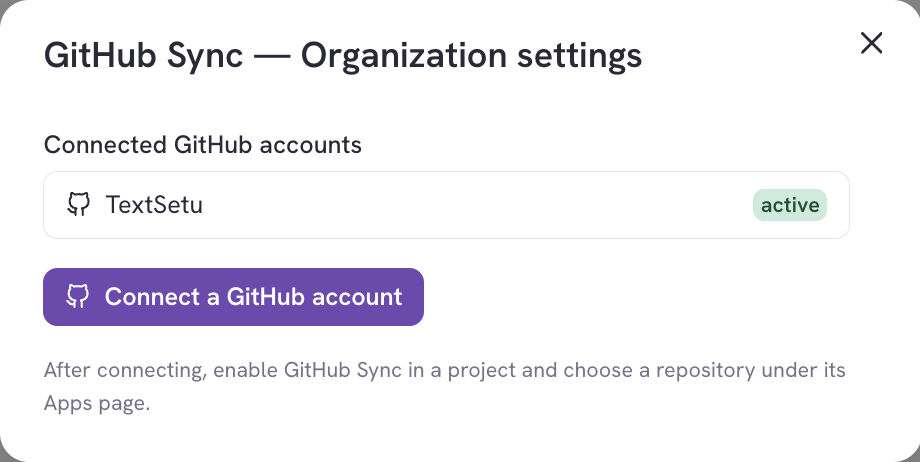
The GitHub App is connected once at the **organization** level — manage the
connected GitHub accounts from the app's org settings:
***
## Connecting a repository
New projects start with a short **setup wizard** that walks you through connecting
and configuring in four steps, teaching what Pull and Push do as you go.
### Step 1 — Connect the GitHub App
Install the TextSetu GitHub App on the repository, then choose the **installation**,
**repository**, and **base branch** to sync with.
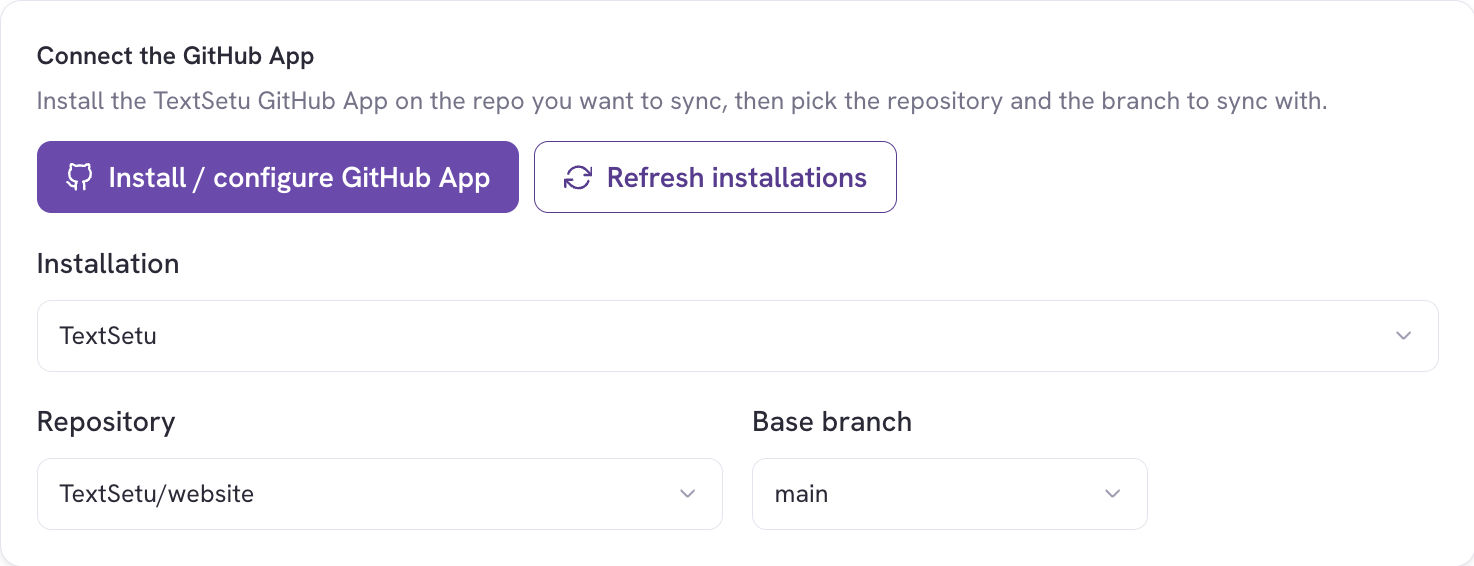
1. Click **Install / configure GitHub App** — this opens GitHub in a new tab. Grant
the app access to the repositories you want to sync, then come back and click
**Refresh installations**.
2. Pick the **installation** (your GitHub org/account).
3. Pick the **repository**.
4. Pick the **base branch** (usually `main`) — this is the branch Pull reads from
and Push targets.
### Step 2 — Configure sync rules
A **sync rule** connects files in your repo to TextSetu. Each rule has two clearly
labelled halves and a file format:
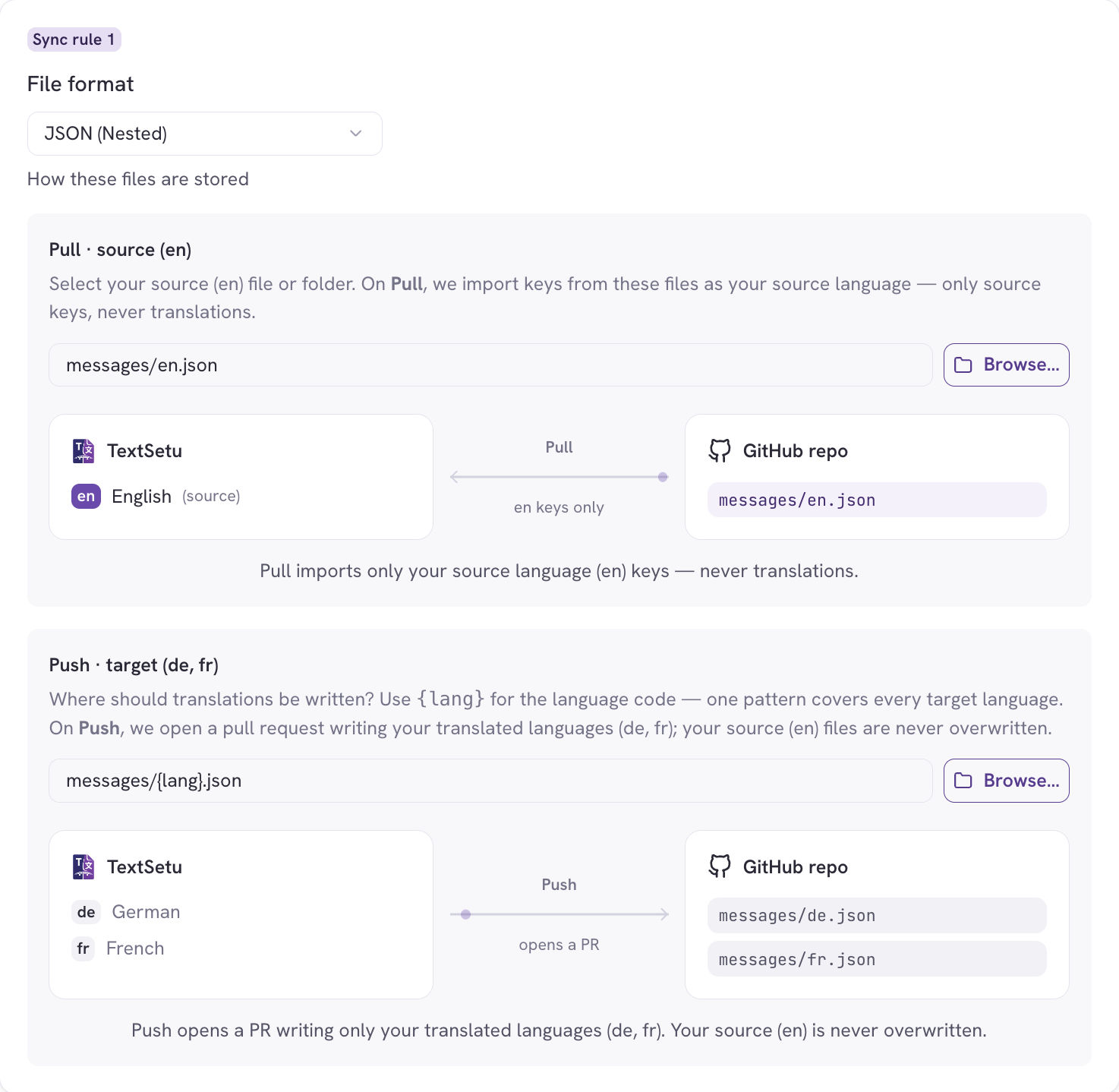
* **File format** — how these files are stored (e.g. *JSON (Nested)*, *Android XML*).
* **Pull · source `(en)`** — select your source file or folder. Use **Browse…** to
pick it from the repo tree; TextSetu derives the pattern for you. On Pull, keys are
imported from these files as your source language — only source keys, never
translations.
* **Push · target `(fr, de, …)`** — where translations are written. Use the `{lang}`
token for the language code; **one pattern covers every target language**. On Push,
TextSetu opens a pull request writing your translated languages; your source files
are never touched.
Each half shows a small **flow diagram** built from your real paths and languages, so
you can see exactly what the rule will move before you commit.
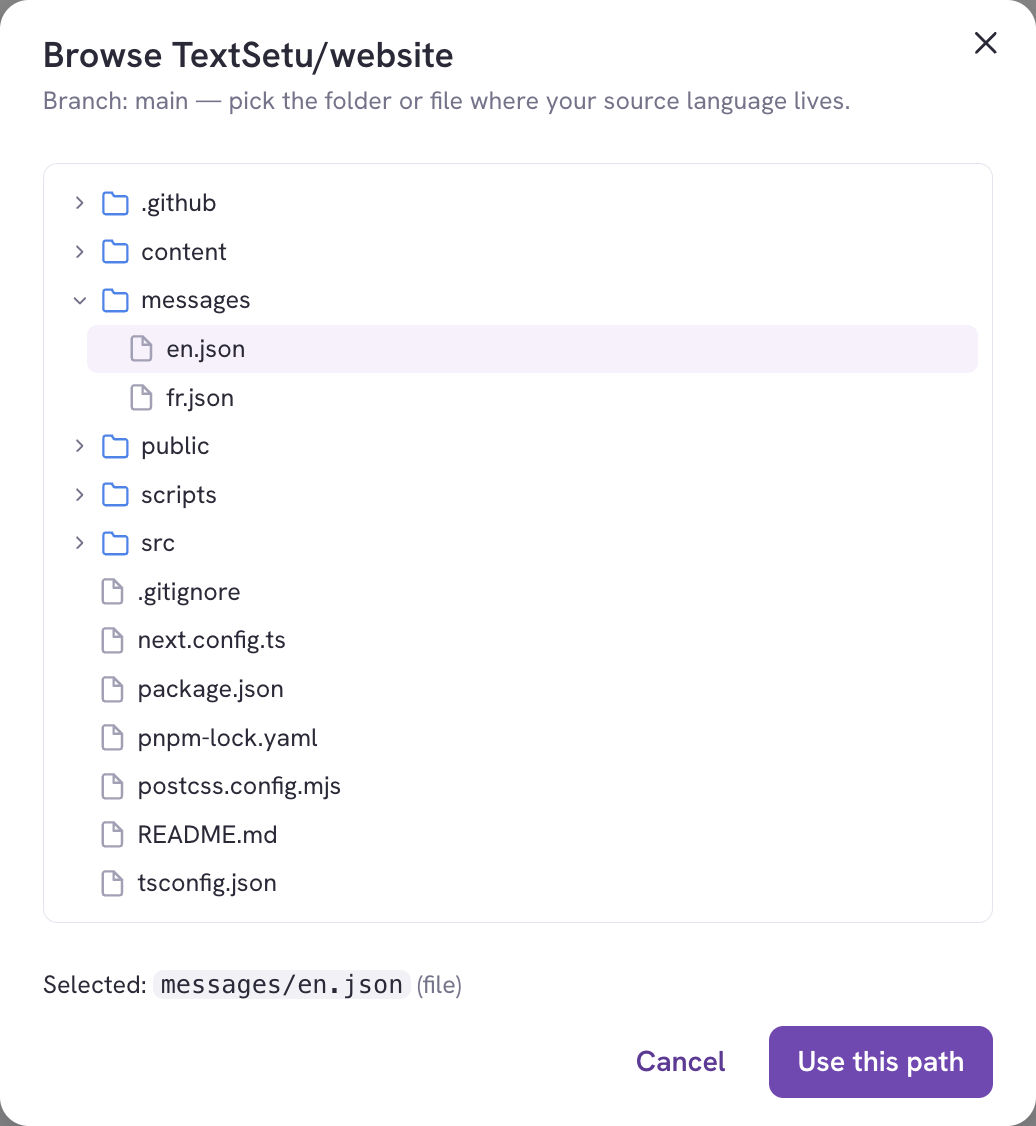
**Browse…** opens a picker of your repo's file tree so you can select the source file
directly instead of typing a pattern:
Add **another rule** if your strings live in several places or formats. If a picked
file's extension doesn't match the selected format, TextSetu shows a warning so you
can fix the file or the format.
**Patterns and tokens.** The source pattern is a glob (e.g. `locales/en/*.json`).
The translation pattern uses tokens that expand per language. See
[Sync rules & file patterns](#sync-rules--file-patterns) below for the full list.
### Step 3 — Import existing translations (recommended)
If your repo already contains translations (not just source), turn on the one-time
**import existing translations** option.

This seeds your project with everything already in the repo — your source **and** any
`fr`, `de`, … files it finds — and **auto-adds** the discovered languages to the
project. It runs **once**; after that, TextSetu owns the translations and ordinary
Pulls import only source strings.
### Step 4 — Finish
Review the summary and choose whether pushes to your branch should trigger a Pull
automatically, then click **Connect repository**.
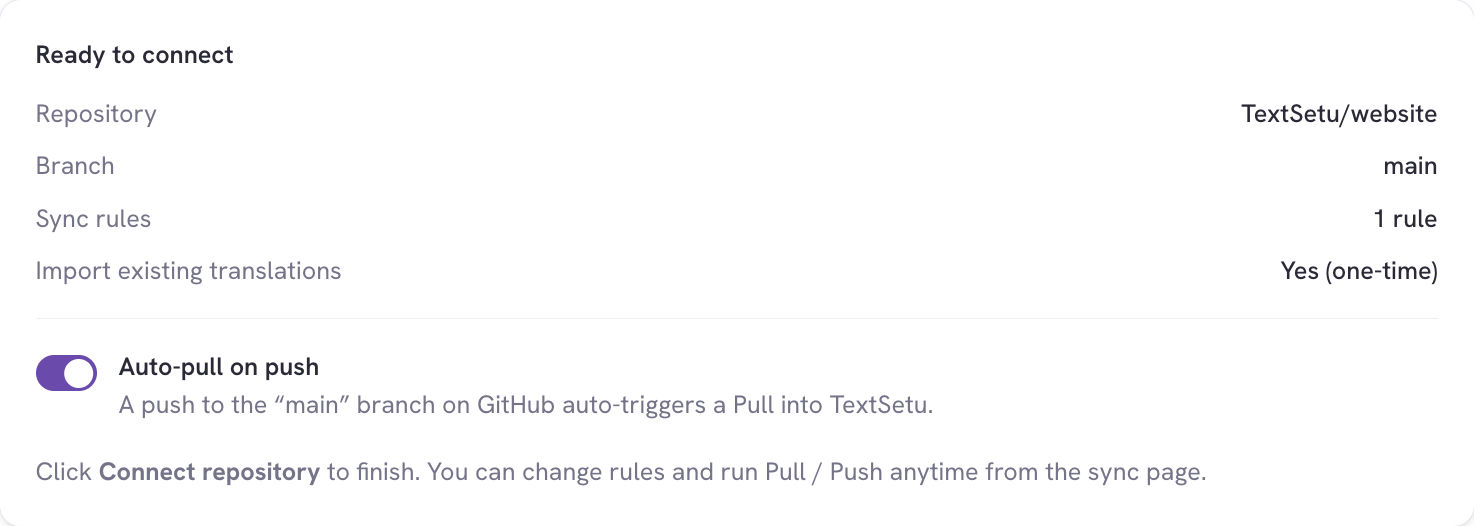
* **Auto-pull on push** — when on, a push to your base branch on GitHub
automatically triggers a Pull into TextSetu (see [Automatic sync](#automatic-sync-webhooks)).
Once connected, the page switches to the management view.
***
## Sync rules & file patterns
A rule's **source pattern** is a glob that selects the source-language files to read
on Pull. The **translation pattern** is a template that, per target language, resolves
to the file Push writes.
Available tokens in the translation pattern:
| Token | Expands to | Example (`fr`) |
| --------------------- | --------------------------------------- | -------------- |
| `{lang}` | Language code as configured | `fr`, `pt-BR` |
| `{locale}` | Language code with a hyphen region | `pt-BR` |
| `{locale_underscore}` | Language code with an underscore region | `pt_BR` |
| `{two_letters}` | Base two-letter code | `fr`, `pt` |
| `{android_code}` | Android resource qualifier | `fr`, `pt` |
| `{osx_locale}` | Apple-style locale | `fr`, `pt-BR` |
| `{filename}` | Source file name | `app.json` |
| `{filename_no_ext}` | Source file name without extension | `app` |
| `{path}` | Source directory | `locales/en` |
**Examples**
| Layout | Source pattern | Translation pattern |
| ------------------------- | ------------------------------------- | ---------------------------------------------------- |
| One folder per language | `locales/en/*.json` | `locales/{lang}/{filename}` |
| Language in the file name | `messages/en.json` | `messages/{lang}.json` |
| Android resources | `app/src/main/res/values/strings.xml` | `app/src/main/res/values-{android_code}/strings.xml` |
***
## Running a sync
From the connected project's **Sync** page you can run each action on demand:

* **Pull source** — import the latest source-language keys from the repo.
* **Push translations** — open a pull request writing your translated languages back.
* **Import existing** — the one-time seed from [Step 3](#step-3--import-existing-translations-recommended); disabled once a managed sync branch exists.
### Confirm before you sync
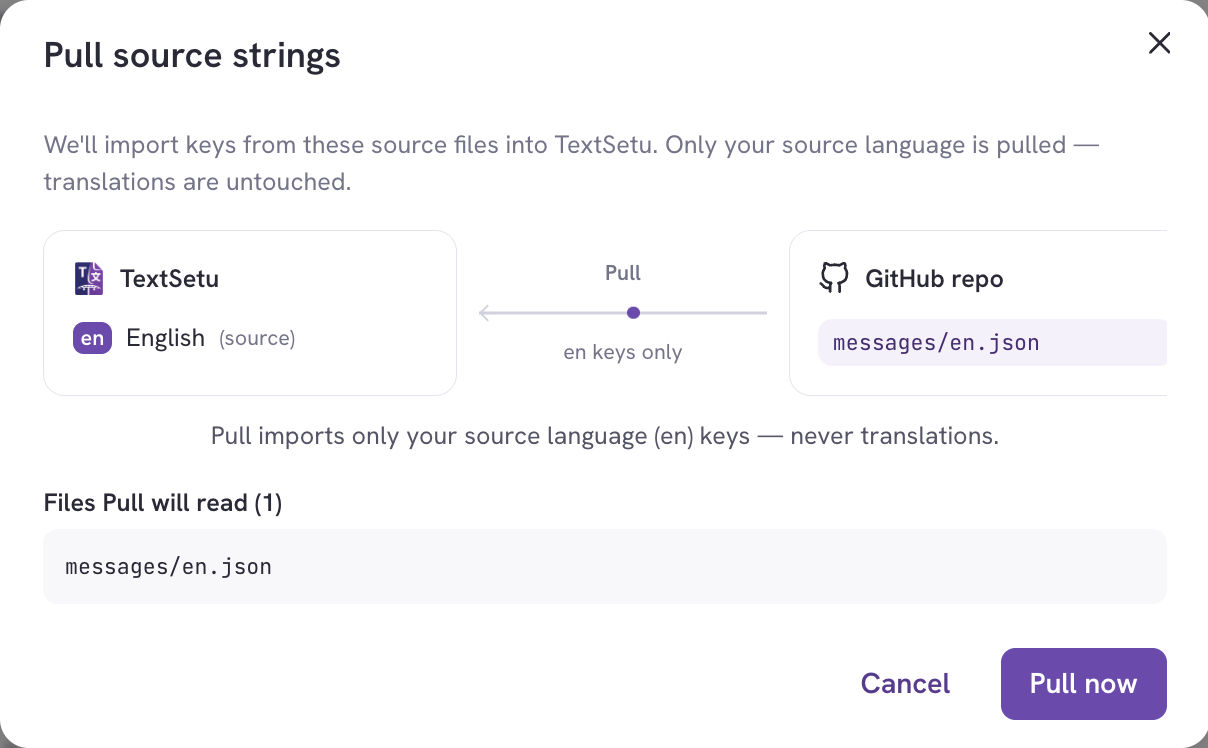
Before an action runs, TextSetu **reads your repository** and shows a confirmation
with the same flow diagram and the exact list of files the action will read or write —
so there are no surprises.
Push shows the same confirmation in the other direction — the languages and the files the pull request will write:
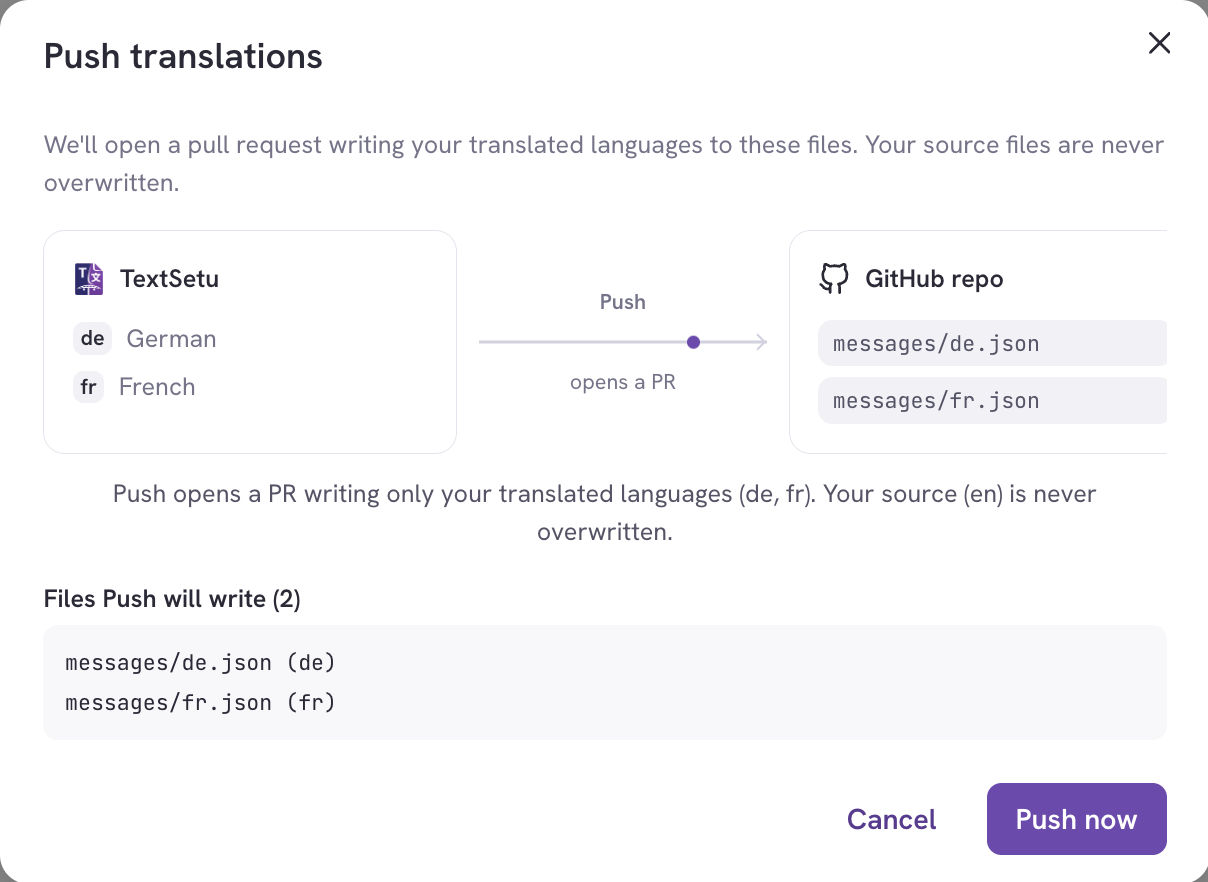
Review the files, then click **Pull now** / **Push now** / **Import now**.
**Large repositories.** If GitHub returns a partial file list for a very large repo,
the confirmation notes that the preview may be incomplete — the sync itself still
processes everything.
***
## Automatic sync (webhooks)
With **Auto-pull on push** enabled, every push to your base branch triggers a Pull, so
TextSetu always reflects the latest source strings. These automatic pulls are
**source-only and additive** — they never delete keys or touch translations.
**Protected branches.** If your base branch is protected, TextSetu can't commit
translations to it directly. Instead, Push routes into an **auto-managed translation
branch** and opens a pull request from there. The branch is created on demand and
cleared once its pull request is merged or deleted, so you review every change through
GitHub's normal PR flow.
***
## Connection settings
The management view exposes the ongoing sync behaviour:
* **Auto-pull on push** — a push to the base branch auto-triggers a Pull into TextSetu.
* **Delete keys missing from repo (cleanup)** — when a Pull runs, keys no longer present
in the repo are removed from TextSetu. Off by default; automatic (webhook) pulls never
clean up regardless of this setting.
* **Sync rules** — edit the Pull source / Push target patterns and formats at any time.
* **Disconnect** — remove the connection (your translations stay in TextSetu).
You can also **pause** a connection to temporarily stop syncing without disconnecting.
***
## Sync history
The **Recent sync runs** table logs every Pull and Push:

Each run shows its **direction** (pull/push), **trigger** (manual, webhook, or
scheduled), **status** (queued → processing → completed/failed), a link to the commit
or pull request, a summary of changes (keys added, values updated, translations
imported), and any error message if it failed.
***
## Permissions
| Action | Permission |
| -------------------------------------------- | ----------------------- |
| Install / manage the GitHub App at the org | **Manage organization** |
| Connect a project, edit rules, run Pull/Push | **Manage project** |
| View sync status and history | **Read project** |
***
## Troubleshooting
**"Pull existing still fetches only `en`."**
A plain Pull is source-only by design. To bring in translations already in the repo,
use **Import existing** (Step 3) — it discovers repo languages and adds them to the
project.
**A file's format looks wrong.**
If a rule's file extension doesn't match its selected format (e.g. a `.mjs` file on a
JSON rule), TextSetu shows a warning. Pick a matching file or change the format.
**Push says "pull-only".**
The connection's direction is set to pull-only. Change the sync direction to allow
pushes.
**No target languages yet.**
Push needs target languages to write. They're added automatically by **Import existing**,
or you can add them from the project's **Languages** tab.
**A run failed.**
Open the run in the history table to see the error. Common causes are a pattern that
matches no files, or a file TextSetu can't parse in the chosen format — the run fails
cleanly and you can fix the rule and re-run.
***
## Related
* [App Store overview](/docs/guides/integrations)
* [Supported file formats](/docs/reference/file-formats)
* [Branches](/docs/guides/branches)
* [Import & Export](/docs/guides/import-export) — the manual alternative to syncing